New Corel 2.0 is here, the successor to Roicon →
The workspace for Roblox teams.

Manage your experiences, schedule countdown icon updates, track analytics and bugs, share Luau scripts and build together in real time. One desktop app.

Free · Windows 10 and 11 · 16 MB · updates itself

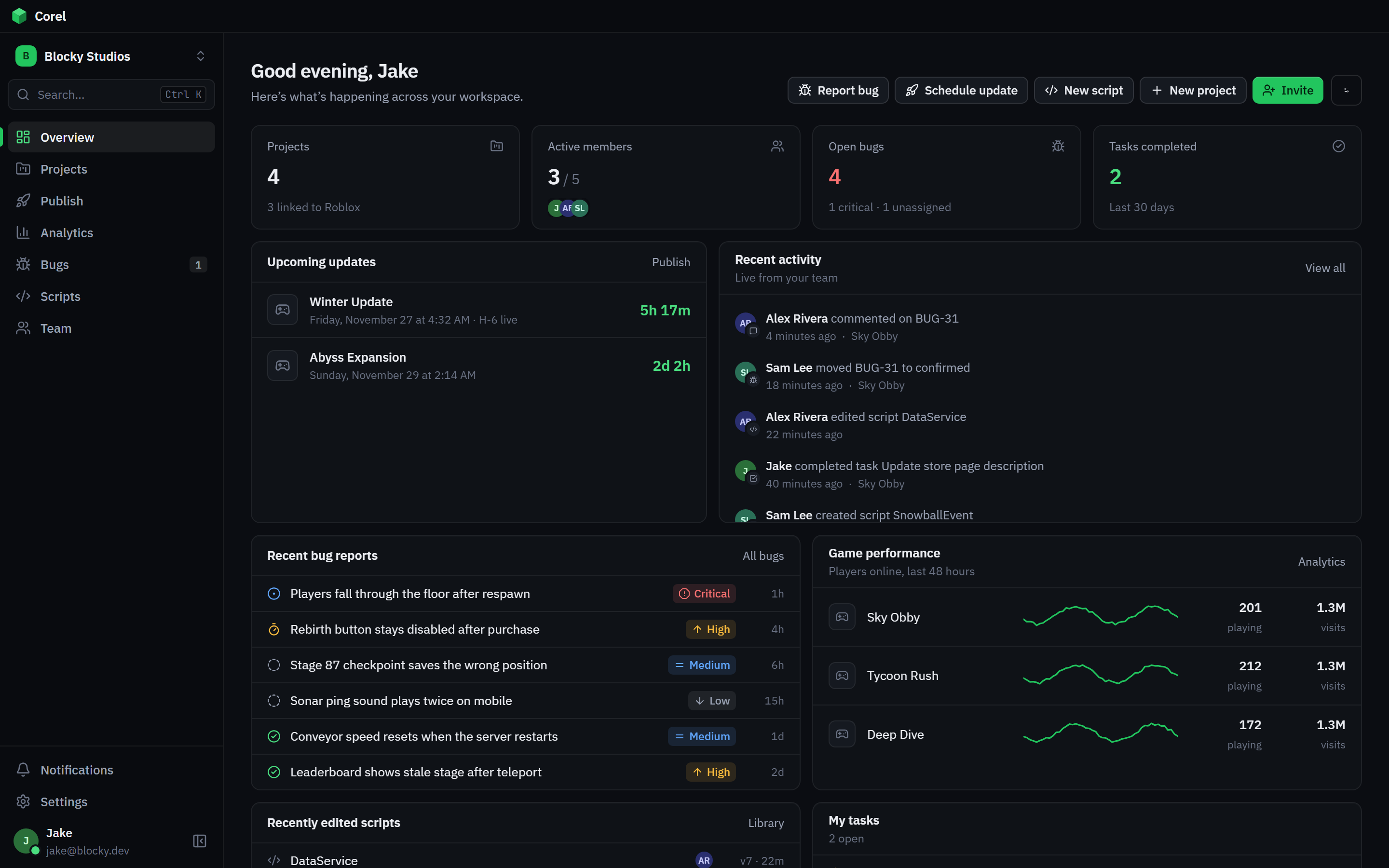
Corel overview dashboard showing workspace numbers, upcoming updates, recent activity and bug reports
Everything in one place

Stop juggling five tools
to ship one update.

Every section is connected to your projects, your team and your Roblox experiences, so nothing lives in a spreadsheet or a lost Discord message.

Overview

Your whole workspace at a glance: upcoming updates, live activity, open bugs and how every game is performing. Rearrange it your way.

Projects

One workspace per experience, with tasks, bugs, scripts, publishing, analytics, members and history. Paste a game link and Corel fills in the rest.

Publish

Countdown icons that switch on schedule. Uploaded early so they pass moderation, applied on every place, live exactly on time.

Analytics

Visits, players online, favorites and rating over time, side-by-side comparisons, plus revenue and retention from your Creator Hub exports.

Bugs

Reports with severity, steps, screenshots and assignees. A bug dashboard, live discussion and a full history for every fix.

Scripts

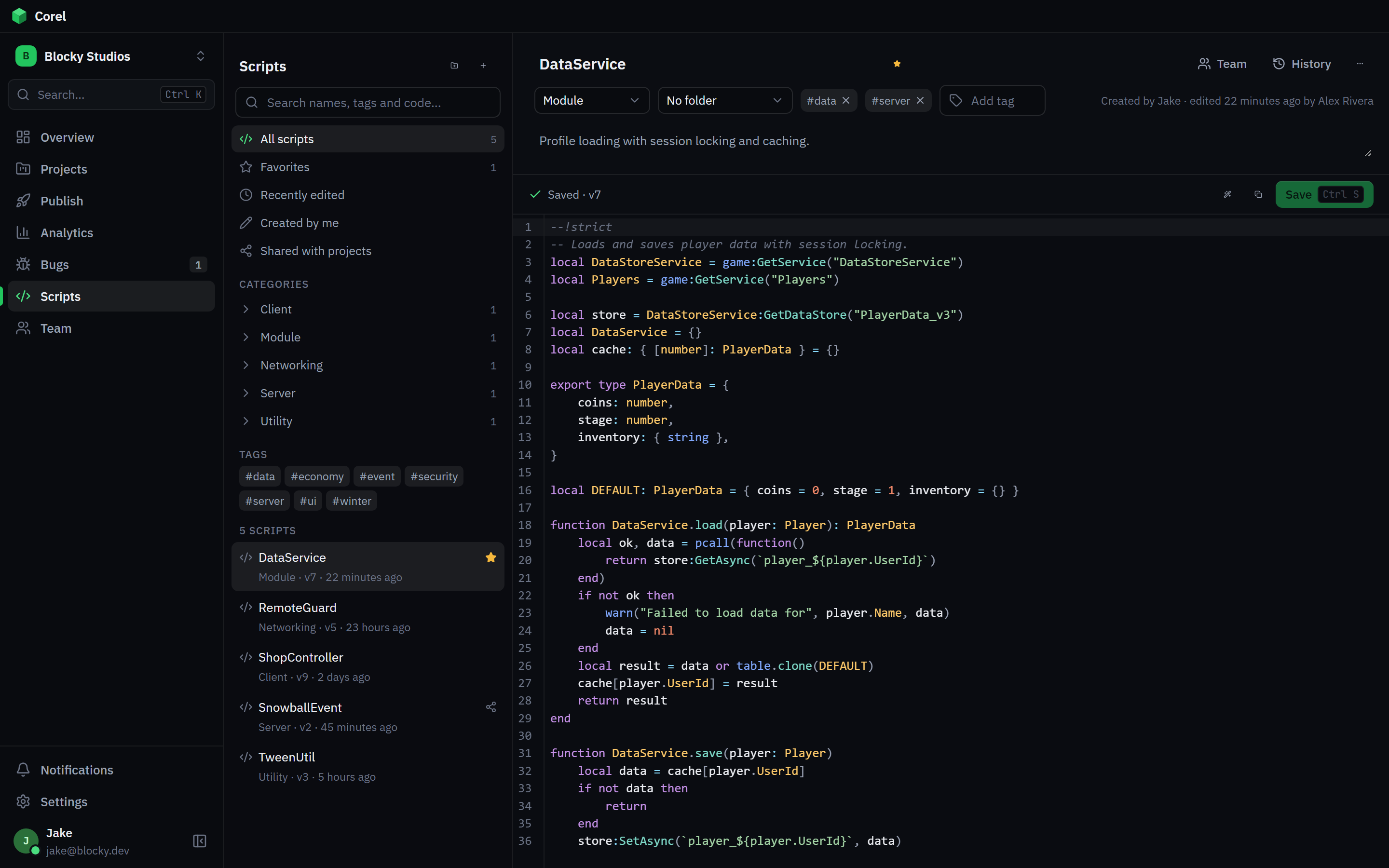
A shared Luau library with a real code editor, folders, tags, favorites, and version history you can diff and restore.

Team

Invite by email or link. Owner, Admin, Developer and Viewer roles, per-person permissions, and who’s online right now.

Search & shortcuts

Find any project, bug, script, task, comment or teammate with Ctrl K. Keyboard shortcuts for everything you do daily.

Notifications

Assignments, comments, invitations, script edits and publishing reminders, in the app and on your desktop.

Publish

Your icon counts down. On autopilot.

Pick your new icon and an update time. Corel builds countdown icons, uploads them early so Roblox approves them in time, and switches your icon at every step, on every place.

  • Custom steps. 12h, 6h, 3h, 1h, or your own timings and overlay art.
  • Announcements with a live preview, copied straight to Discord.
  • Honest status. A step shows live only after Roblox accepted it.
  • Team-wide. Everyone sees what’s scheduled and when.
12 hours countdown iconH-12
6 hours countdown iconH-6
3 hours countdown iconH-3 · live
1 hour countdown iconH-1
New iconNew
A closer look

Built like a real developer tool.

Dark by default, dense where it matters, and fast to navigate. Light theme and six accent colours if you prefer.

Real-time collaboration

Your whole team, on the same page. Literally.

When someone reports a bug, comments, moves a task or saves a script, everyone with access sees it instantly. No refreshing.

  • Presence: see who’s online, which project they’re in and who’s editing a script.
  • Safe editing: saves never overwrite a teammate’s work, and every version can be restored.
  • Roles that are enforced by the server, not just hidden buttons.
  • Live activity feed filtered by project and event type.
Shared script editor
Your data stays yours

Private by design.

Roblox sign-in tokens never leave your PC. Your workspace sign-in is encrypted with your Windows account, and every row in the database is protected by access rules.

0tracking or telemetry
4team roles, customizable
15 minanalytics snapshots
∞script versions kept

Ship your next update with Corel.

Free for Windows. Coming from Roicon? Your experiences and schedules come with you.